Thursday, April 2, 2020

Best Bike Helmets for Kids

When looking for the ideal helmet for your child, you’ll want to consider a variety of both safety and comfort factors. After all, if a helmet is uncomfortable, your kid won’t want to wear it. The table below lists some of the most important features of our top helmet picks and shows how each helmet stacks up against the competition.

Top 4 Bike Helmets for Kids

  1. Giro Scamp Helmet | Read Review
  2. Razor Youth  Helmet | Read Review
  3. Bell Sidetrack Helmet | Read Review
  4. Krash Black Gator Helmet | Read Review
List Price *
Head Circumference
Adjustability
Buckle Type
Construction
Certification
Visor Type
Number of Vents
Giro Scamp
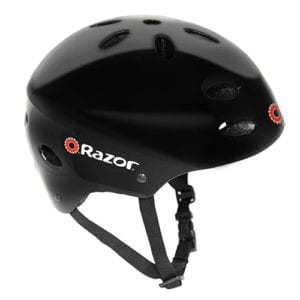
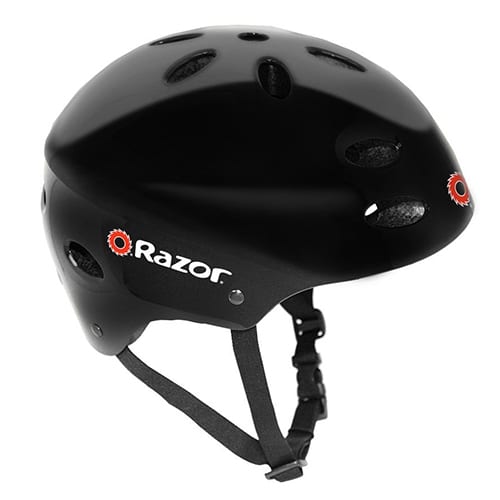
Razor V-17 Youth Multi-Sport
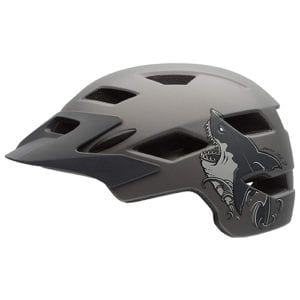
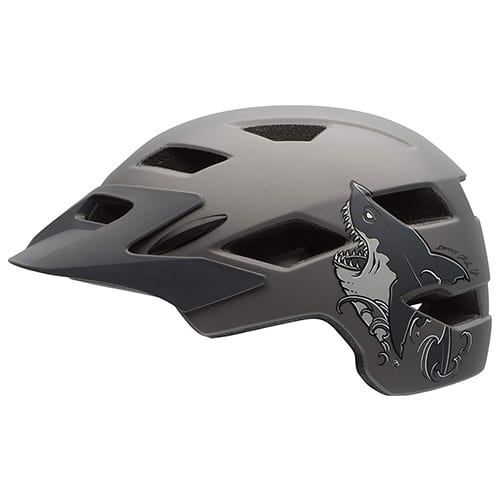
Bell Sidetrack
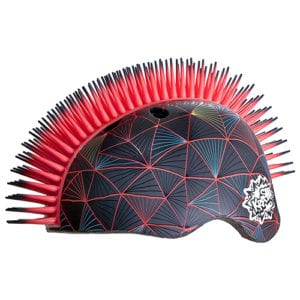
Krash Black Gator
product image of Giro bike helmet product image of Razor kids helmet product image of Bell kids bike helmet product image of Krash helmet for kids
$39.95 $19.96 $40.00 $24.36
49-53 cm 53-57 cm 47-57 cm 54-58 cm
Pads and dial Pads Pads and dial None
Non-pinch Standard Non-pinch Standard
In-mold Hardshell In-mold Hardshell
CPSC 5+ CPSC CPSC 5+ CPSC 5+, astm
Integrated None Detachable None
8 17 15 6
View on Amazon View on Amazon View on Amazon View on Amazon

Amazon.com prices as of 04/02/20 12:20 pm MST. See full disclaimer.

Bike Helmets for Kids: Our Top 3 Picks

#1. Giro Scamp Helmet

It can be tricky to find a helmet that fits smaller heads, but parents love that the Giro Scamp offers the latest safety technology and fun designs in a size that fits children from twelve months up to age five. The only downsides to this helmet were a few minor convenience issues.

Best for Babies & Toddlers
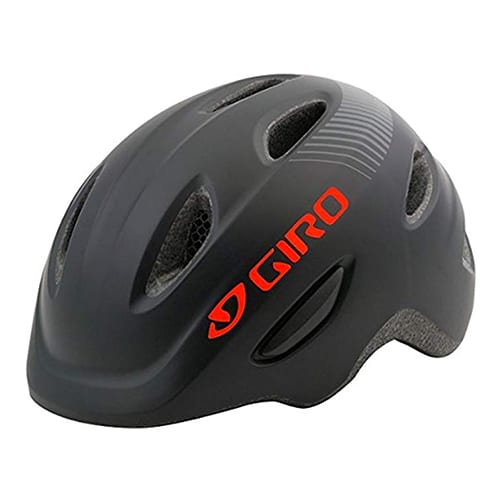
product image of Giro bike helmet

Giro Scamp

What We Like

  • Optional MIPS Technology
    The Giro Scamp MIPS incorporates a Multidirectional Impact Protection System to allow the helmet to absorb more impact from a nondirect hit. This technology adds an extra layer of protection to the helmet.There is some debate in the cycling community about the effectiveness of MIPS, with some saying the extra cost outweighs any measurable benefits. Giro offers the Scamp in both MIPS and non-MIPS versions, allowing parents to decide whether or not it’s worth the higher price tag.
  • Flat Back
    The back of the helmet has a low profile, making it ideal for younger children riding in a seat on the back of a parent’s bike or in a bike trailer.
  • Room for a Ponytail
    Leaving long hair down while wearing a helmet can lead to overheating in warm summer months. The Giro Scamp is equipped with a vent at the back of the head to allow for ponytails.
  • Adjustable Size
    Kids grow a lot between one and five years of age, and we like that the Giro Scamp can grow with them. Its adjustable Roc Loc Jr. system can expand and contract the interior of the helmet for a snug fit from trailer to training wheels.
  • Pinch-Guard Buckle
    It’s easy for little chins to accidentally get caught in a standard quick-clip buckle, but the Giro Scamp’s chin strap features a buckle guard for a pain-free start to every ride.

What We Don’t Like

  • Not Enough Vents
    Most children’s helmets have fifteen or more vents to allow for air circulation, but the Giro Scamp has only eight, which could leave your little one feeling sweaty.
  • Slippery Strap
    Parents’ main complaint about the Giro Scamp was that the chin strap would loosen during the ride, and they had to tighten it frequently.

#2. Razor V-17 Youth Multi-Sport Helmet

With a cool shape that will make your kid feel like an X-Games pro, the Razor V-17 is stylish and comfortable, and it offers more protection than a typical bike helmet. It’s also inexpensive and comes in a wide range of colors, but depending on your child’s head shape, it might not be the best fit.

Best for Budget
product image of Razor kids helmet

Razor Youth Helmet

What We Like

  • Multi-Sport Functionality
    This helmet is designed for biking, skateboarding, and scooters—you can even use it as a ski helmet or for other snow sports. It’s an all-in-one helmet, so you don’t have to mess around with multiple helmets for different activities.
  • Whole Head Coverage
    Most bike helmets only come down about halfway on the back of the head, but the Razor V-17’s multi-sport design covers the entire back of the head, giving your child full protection.
  • Comfort and Style
    Parents say their children prefer this helmet over other bike helmets due to its comfort and trendy design. The seventeen vents help keep riders cool, and the variety of designs appeal to all different ages and personalities.
  • Affordable Price
    At around $20, the Razor V-17 gives your kid great protection at an affordable price.
  • Excellent Impact Absorption
    The Razor V-17 touts high ratings for impact absorption.

What We Don’t Like

  • Heavy
    Because the V-17 is a multi-sport helmet, it’s heavier than other standard bike helmets.
  • Difficult to Fit
    The only way to adjust how the V-17 fits is with pads and the chin strap, and reviewers say that it’s tricky to get a snug fit.
  • Lacking a Visor
    No visor means less eye protection from the sun and less face protection in case of a crash.

#3. Bell Sidetrack Helmet

The Bell Sidetrack has a trendy, mountain-bike style design, and safety experts give it top ratings for crash protection. It’s priced reasonably, and its extra comfort features put it near the top of our list for best kids’ bike helmets, but there’s a trick to getting it to fit properly.

Best Safety Pick
product image of Bell kids bike helmet

Bell Sidetrack Helmet

What We Like

  • Visor
    The Sidetrack has a sturdy snap-on visor that provides excellent sun and rain protection.
  • MIPS option
    The youth version of the Bell Sidetrack comes in a MIPS version (that’s a Multidirectional Impact Protection System), but it costs about $20 more than the non-MIPS helmet.
  • Covered MIPS Anchors
    The padding is strategically placed to cover the MIPS anchors, which prevents a child’s hair from getting caught in them.
  • Tri-Glide Strap Sliders
    The Sidetrack’s tri-glide sliders keep straps securely in place much better than the traditional sliders found on many other models, and they’re also easy to adjust if needed.
  • Extended Rear Coverage
    We like that the Sidetrack still looks like a classic bike helmet but has more coverage for the rear of the head than traditional bike helmets do.
  • 1-Year Warranty
    If your helmet is defective, you can contact Bell customer service within one year and get a replacement helmet.

What We Don’t Like

  • Hard-to-Reach Dial
    The placement of the dial on the interior of the helmet’s cage makes it difficult to reach when you’re trying to adjust it on your child’s head. We recommend getting it as close to a good fit as possible while it’s on their head, then taking the helmet off to make any additional adjustments.
  • Excess Strap
    The Bell Sidetrack has quite a bit of excess strap that can bunch up next to the face. It won’t affect the safety of the helmet, but kids might find it annoying. We recommend cutting off the extra strap and melting or taping the ends to prevent fraying.

Honorable Mention

Most Stylish: Krash Black Gator

When it comes to looking awesome, the Krash Black Gator multi-sport helmet takes the prize. Any kid will be eager to wear a helmet that’s sprouting a Mohawk. But it’s not just about looks—the Krash is certified by the Consumer Product Safety Commission (CSPC) and the American Society for Testing and Materials (ASTM), and it has vents to keep your child feeling—and looking—very cool. Just be careful when storing it, as some parents say the silicone spikes can easily get bent out of shape.

FAQs

What is EPS?
EPS stands for Expanded Polystyrene. It’s the same kind of foam used to make disposable picnic coolers. A higher-quality EPS is often used to make bike helmets because it’s both rigid and lightweight.

What is MIPS?
MIPS stands for Multidirectional Impact Protection System. Swedish scientists developed MIPS technology for bike helmets to reduce stress on the skull from rotational impacts. It cradles the head in a second inner shell that attaches to the outer helmet shell with elastic bands to absorb impact and allow the head to rotate in a controlled way during a crash. The biomedical team who developed MIPS actually based its design on the way the brain is naturally protected inside the skull.

How can I tell if my child’s bike helmet fits correctly?
The helmet should be snug on their head and come just to the top of their ears. If your child’s eyebrows move when you shift the helmet on their head, that’s a good indicator that it’s snug enough. The strap should be tight against their chin when they open their mouth all the way but loose when their mouth is closed. The helmet should rest on the forehead about two adult finger widths above the eyebrows.

What’s the difference between traditional helmets and multi-use helmets?
A traditional bike helmet is lighter and has more vents than a multi-use (skater style) helmet, so kids often find them more comfortable. But multi-use helmets are usually dual-certified, so they can be used for biking, riding a scooter, skateboarding, and more. Plus, they often provide a better fit for kids with oddly shaped heads. Multi-use helmets can offer more protection for the back of the head as well.

What is the difference between in-mold and hardshell construction?
All helmets have an inner EPS (foam core) layer and an outer plastic shell. Bike helmets are usually made with in-mold construction, where the EPS is fused to a thin plastic shell, keeping the shell from cracking or separating from the helmet. With hardshell construction, the plastic shell is thicker, so it can’t be fused to the EPS. Instead, it’s glued to the foam core. ASTM standards require multi-use helmets to be more durable than bike helmets, which is why multi-use helmets are usually hardshell.

What’s the difference between CPSC and ASTM certification?
The CPSC (Consumer Product Safety Commission) is a US government organization that certifies US bike helmets for safety based on a specific set of cycling safety standards. The ASTM (American Society for Testing and Materials) is an independent, international nonprofit organization that tests and certifies multi-sport helmets for everything from horseback riding to snowboarding to mountain biking. For bike helmets, look for a helmet that’s at least CPSC certified.

Methodology

To research the best bike helmets for kids, we studied the products available on the market, checked out what others were saying about them, and looked for products that consistently received favorable reviews and high ratings. Learn more about our methodology.

Sources

  1. Centers for Disease Control and Prevention, “Head Injuries and Bicycle Safety”
  2. Safe Kids Worldwide, “Bicycle, Skate, and Skateboard Safety Fact Sheet (2016)”

Disclaimer

*Amazon.com list price as of 04/02/20 12:20 p.m MST. Product prices and availability are accurate as of this date/time indicated and are subject to change. Any prices and availability information displayed on Amazon at the time of purchase will apply to the purchase of this product. Safewise.com utilizes paid Amazon links.
Certain content that appears on this site comes from Amazon. This content is provided “as is” and is subject to change or removal at any time.

2019 Best Home Security Systems

Vivint

Best Home Automation

ADT

Best Monitoring

Frontpoint

Best Customer Service

Protect America

Budget Pick

Link Interactive

Best Basic Plans

The post Best Bike Helmets for Kids appeared first on SafeWise.

Wednesday, April 1, 2020

April Home Maintenance and Safety Checklist

Calendar Icon
Last Updated: A day ago
Check our Spring Safety Checklist for tips on how to disinfect your home amidst the COVID-19 outbreak.

April is prime time for spring cleaning, gardening, and enjoying springtime. This year, go beyond dusting and mopping. Our checklist covers home improvement and safety tips for indoor and outdoor tasks. Learn how to boost your home’s curb appeal, kick spring allergens, and get a head start on the spring thaw this April.

1. Improve Indoor Air Quality

Spring allergies can leave you sniffling and sneezing, but there are a few ways you can fight back. Here are a few simple ways to improve air quality in your home.

Good Old Fashioned Cleaning 

Never underestimate the power of a good old fashioned cleaning. Regular dusting and vacuuming can keep the allergens in your home to a tolerable minimum. But if your allergies continue, deep clean surfaces that don’t get as much attention. 

Ceiling fans and window sills are popular gathering spots for dust bunnies. Check under the couch and furniture for other spots to clean. 

And don’t forget the laundry. Washing bed sheets, curtains, and rugs in spring can lower the dust mite population in your home, letting you breathe easier. 

Get an Air Purifier

levoit air purifier

Levoit Air Purifier

  • Ozone-free technology
  • Price under $100

Air purifiers aren’t a cure-all, but they sure can help. Look for one that matches the area you want to treat. Personal air purifiers cover about 200 square feet while home air purifiers can cover up to 1,000. Choose one with a HEPA filter, the recommendation of organizations like the American Lung Association and the Environmental Protection agency. See our full comparison of the top air purifiers for your home.

Clean Out the Vents 

All that dusting and air purifying won’t do much good unless you change the vents in your HVAC system, bathrooms, and hallways. Make sure that dust, dander, and pollen gets trapped by a clean filter. 

Don’t forget the laundry room—the dryer vents in your laundry room may also need a little cleaning. Plus, not cleaning the lint trap can create a fire hazard.

2. Outdoor and Deck Maintenance 

Once the snow and ice has cleared, it’s time to clean off the deck and outdoor areas for spring. Your porch, windows, screens, and drainage system may have taken on dirt and damage. 

Pressure Wash

Pressure washing the deck, porch, sidewalks, and side of your house improves curb appeal, but it also keeps your home healthy. All that set-in dirt, grime, and mildew can damage wood and siding if it’s not treated. This April, buy a pressure washer or rent one from a hardware store.

Replace Weatherstripping

Take a look at the weatherstripping on your windows and doors. If the rubber or foam looks worn, it’s time to replace it. Weather stripping keeps those April showers out and the AC or heat inside. 

Weatherstripping also makes your doors and windows seal tighter, making them harder for intruders to break through. After all, the first seven days of April mark Window Safety Week.

Pro Tip

Consider adding contact sensors to your doors and windows. You can find standalone devices or add them to your existing security system. These handy gadgets ping when a door or window opens, letting you keep tabs on kids, visitors, and even unwelcome guests.

3. Compost, Create, and Conserve

April 22 is Earth Day, a celebration of all things green and sustainable. You can pitch in with a few of these home improvement ideas or April.

Start Composting 

Coffee grounds, egg shells, veggie clippings, and tons of organic materials get tossed into landfills every day. Turn your trash into a pile of smelly gold for your garden by starting a composting routine. 

Composting bins are affordable and easy to use. It takes a few weeks for all the materials to decompose (why we recommend keeping the bin outside), but after that time it turns into nutrient-rich material perfect for planting and gardening. 

Keep an indoor bin for kitchen scraps and an outdoor bin to do the actual composting. Check with your local services to see if compost collecting is available in your area. If you don’t have space for your own compost, the city might be able to use it. 

Pro Tip

What you can compost: Organic materials like eggshells, coffee grounds (and filters), old newspapers, tea, and tea bags, pet and human hair, and small pieces of wood like matches or toothpicks. Aim for a mix of soft, organic material and sturdier materials for the best results.

What you can’t compost: Dairy and animal products take longer to break down and attract pests. Oils, fats, and animal waste (thanks, Fido) are also bad choices for your compost pile.

Plant a Tree for Earth Day 

Plant a tree in your backyard to celebrate Earth Day this year. There are tons of helpful sources for selecting placement and caring for your new sapling. It’s a great activity to do with your kids as you watch them and your new tree grow tall and strong. 

Check to see if your area has an urban forestry program. The program will send you a tree to plant in your yard or parking strip. All you have to do is keep it watered and happy. You can also get help from the urban forestry department if you have questions about planting a new tree on your property. 

If you don’t have room in your backyard or rent your home, consider donating to a nonprofit like One Tree Planted, The Earth Day Network, or The National Forests Foundation that will plant trees for you.

Consider Smarter Energy

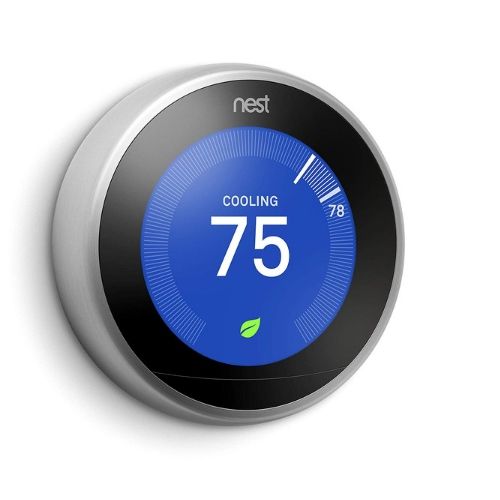
Nest Learning Thermostat

Nest Thermostat

  • Learning thermostat adjusts to your routine
  • Adjusts to light levels in your home
  • Compatible with Alexa and Google Home

Smart home devices can make your home greener too. This April, consider making your home energy use a little smarter with a smart thermostat, smart bulbs or plugs, and solar powered lights or cameras. 

These devices give you control over your energy use while you’re home or away. Turn lights and appliances off and on remotely, and even change the temperature of your home. Solar powered lights don’t need electricity from your home to work, making them a green option for outdoor devices. 

4. Prepare for Summer

Summer may still be a couple of months away, but there are a few things you can do before the heat kicks in. April is a great time to check on your HVAC system, sprinklers, patio, and grill.

Check the Sprinklers

Start the season by checking or installing your sprinkler system in April. Before installing sprinklers, be sure the ground below you is fully thawed, remove any obstructions like rocks or sticks, check the water pressure, and test the valves. 

Test the Air Conditioning

After it’s been benched all winter, check your AC unit to make sure it’s ready for late spring and summer. Check that all the panels are intact, repair or replace any pipe damage, clean up that beauty, and test it. 

Wash Patio Furniture

Don’t wait until June to enjoy your patio or porch. Dust off the tables and chairs and set them out in April to enjoy the sunshine and a good book. Wipe down all the furniture with disinfectant wipes and wash any cushions or covers. Pati-oh yeah.

Clean off the Grill

Fresh grilled veggies and juicy burgers never go out of season—it’s just finally nice enough to grill outside. Start by cleaning the char off the grill and dumping the old charcoal or checking your propane tank levels. 

April Home Maintenance Tips FAQ

How do I prepare for spring and summer storms?

April brings warmer air that clashes with the leftover cold air from winter. All this blending means tornados and storms throughout the country. The Southeast and Midwest tend to get hit especially hard. Here are a few quick tips to plan for storm season. 

  • Establish A Plan: talk to your family and make sure everyone knows what to do.  
  • Find Some Shelter: basements and storm shelters are best, but if these aren’t available, choose an interior room with small or no windows (like a bathroom) to wait out the storm. 
  • Use A Weather Radio: tornados can knock out cell service, so keep a weather radio on hand with access to NOAA weather reports and multiple power sources. 

What can I do to keep my home safe all year?

Cleaning your gutters regularly can keep your roof in good shape. Regularly testing fire, smoke, and carbon monoxide detectors is also a good habit to start. And if you have a home security system, we recommend testing it once a month too. 

Disclaimer

Amazon.com list price as of 4/01/20 9:20 p.m. MST. Product prices and availability are accurate as of the date/time indicated and are subject to change. Any price and availability information displayed on Amazon at the time of purchase will apply to the purchase of this product. Safewise.com utilizes paid Amazon links.

Certain content that appears on this site comes from Amazon. This content is provided “as is” and is subject to change or removal at any time.

The post April Home Maintenance and Safety Checklist appeared first on SafeWise.

Bouncie GPS Vehicle Tracker Review

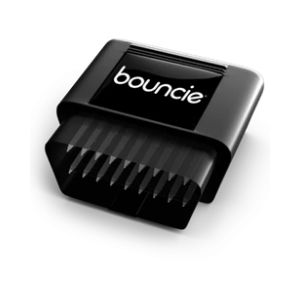
Bouncie GPS tracker

Overall Rating

4/5
  • Real-time GPS tracking
  • Customizable notifications
  • Alert delays
  • Monitoring starts at $8/mo.

Bottom Line: Best Month-to-Month Option

The Bouncie device works a lot like other port-based GPS trackers: just plug it into your OBD port (the on-board diagnostics port under your dashboard) and it will start to track your car’s location. It uses a cellular connection to send trip data to your smartphone via AT&T’s 3G network, just like the similar GPS tracker Vyncs. It had some occasional two- to five-minute delays in transmitting data, but overall we found the connectivity to be good.

Pros

  • 15 second location refresh
  • Easy installation
  • No batteries needed
  • Alexa, Google, and IFTTT compatibility
  • Geofencing alerts

Cons

  • Delayed notifications
  • No crash detection

Bouncie Pricing

Monthly Cost
Equipment Cost
Trial Period
Contract
Home Automation Features
Standout Features
$8
$67
45 days
None
Compatible with Amazon Alexa, Google Home, IFTTT
Vehicle maintenance alerts
Free roadside assistance
15 second location refresh
View on Bouncie

Compared to similar OBD-port GPS car trackers, Bouncie falls in the middle range when it comes to price. It strikes a good balance between its competitors with a slightly higher initial device cost but no activation fee, a low monthly subscription fee, and no long-term contracts.

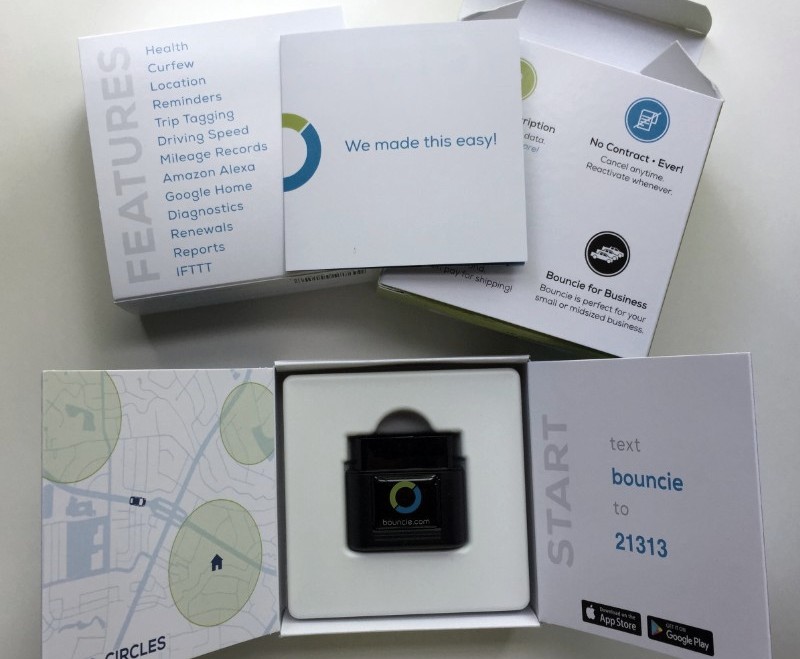
unboxing the Bouncie

A glimpse at what the Bouncie looked like when we unboxed it. 

Smart Home Integration

Bouncie stands out from the competition when it comes to compatibility with smart home technology. It’s compatible with Amazon Alexa, Google Home, and IFTTT (If This, Then That), but we found the IFTTT to be the most useful. You can use IFTTT applets to do things like turn on lights when you arrive home or turn off your security system. You can also set it up to change your smart thermostat settings when your vehicle leaves the house to help you save on energy costs.

We weren’t very impressed with the Alexa and Google connection just because there aren’t a lot of useful commands you can use. Probably the most useful command is “Alexa, ask Bouncie ‘Do I need gas?’” so you don’t have to run out to your car and turn it on to check. But Bouncie’s fuel tracking function works only with cars that send that information to the OBD port, and the 2014 Toyota Sienna we used to test the Bouncie was not one of them. Other commands include things like “Where is my car?” and “How far did I drive this month?”

Installation and Setup

Bouncie installation is a breeze—you just plug it in—but we do recommend setting up your account on your phone while you’re in your car, because it asks you for information like your VIN number and mileage. Keep in mind that the Bouncie needs a few trips to get its bearings before it can start sending you trip data, so be patient.

Bouncie installed in car

Bouncie plugged in to our tester’s car.

App and Features

The Bouncie mobile app is intuitive and easy to use. It saves trip data so you can review it at your convenience and then either archive or delete it. The app also lets you customize all the different things the GPS tracks:

  • Maximum speed
  • Rapid acceleration and hard braking
  • Driving distance
  • Idle time
  • Fuel economy
  • Speed bands
  • Speed Limit Alerts
  • Geofencing

Bouncie refreshes the GPS location once every 15 seconds during a trip, and we found it to be more accurate and less glitchy than GPS phone tracking apps like Life360. The Bouncie can now tell you if your car went over the legal speed limit. It can also track approximately how fast it was going based on the five color-coded speed band settings. You can customize the speed bands to track whatever speed ranges you set, like green for speeds between 0 and 30 mph. Bouncie can alert you if your vehicle goes faster than a specific speed you choose, but it doesn’t send this information to your phone until after the vehicle is already parked.

bouncie notifications on smartphone screen
screengrab of bouncie app

What you’ll see on your phone when you’re using the app. 

A common complaint with GPS trackers is that the accelerometer that tracks abrupt stops and starts is too sensitive. We like that the Bouncie has three different settings for hard braking and rapid acceleration: light, moderate, and excessive. We kept it on the moderate setting and it performed perfectly.

The vehicle health reports are limited to battery fuel levels (for certain cars), but the battery alert proved to be useful. It alerted me to a low battery when I was waiting for my daughter outside an event and my car was off. Sure enough, when I tried to start my car, it wouldn’t start. Fortunately, the notification from Bouncie gave me enough lead time to round up another vehicle for a jumpstart, and I was ready to go again before my daughter was finished with her event. Had I waited until it was time to leave to start the car, I would have been in for quite the surprise! Bouncie definitely saved the day.

If I hadn’t had been able to find a helping hand that day, I could have clicked the Assistance section of the app and used one of my three free roadside assistance requests included with the Bouncie service for the year. It covers jumpstarts, flat tires, gas, lockouts, and towing.

Customer Service

We really liked the Bouncie website’s Info Hub. It has helpful troubleshooting info and answers to almost any question you might have about your Bouncie. While we didn’t need to use the customer service during our Bouncie trial run, other customers say the representatives respond promptly and are friendly and helpful.

How Bouncie Stacks Up

My teenage son is about to start driving, and I’m seriously considering installing the Bouncie in his car. Its GPS location tracking is much more reliable than the free GPS phone tracking apps I’ve used in the past, and it doesn’t depend on my kid remembering to keep his phone charged. I like that the GPS refreshes every 15 seconds, compared to the MOTOsafety tracking device that refreshes only every three minutes.

The trip data records give us a good opportunity to talk about safe driving habits and to discuss close calls that I might not otherwise know about. I can also get my son into the habit of paying attention to insurance, inspection, and tag renewals. Plus, I like that he’d have access to roadside assistance if needed. Bouncie still doesn’t have crash detection, but it’s listed as “coming soon” in the product features.

Bouncie has a small month-to-month payment, so there’s no long-term commitment like the one-year, up-front payment that Vyncs requires. If my son’s driving is up to par, then I can stop my Bouncie service without penalty and hold on to the device until my daughter is old enough to start driving. Overall, it’s a solid investment for both short-term and long-term use.

Device Type
Price for First Year
Price for Successive Years
Contract
Standout Feature
Learn More
Bouncie Vyncs MOTOsafety
OBD port plug OBD port plug OBD port plug
$163 $108.92 $254.87
$96 $68.95 $239.88
None 1 year None
Smart home compatibility Works in 177 countries Driver safety report card
View on Bouncie View on Amazon View on Amazon

Data effective 5/14/2019. Offers and availability subject to change.

FAQs

Is it legal to put a vehicle tracker on my teenage driver’s car?

Generally speaking, your best bet is to install location tracking devices only on vehicles you personally own. But in some states it is legal for a parent to put a tracking device on their minor child’s vehicle without their consent, even if the child owns the vehicle.1 Check your state’s laws if you’re not sure.

Will a vehicle GPS tracker work on a smart car?

Yes. Most smart cars have OBD ports under the steering columns just like regular cars do, so a GPS tracker should work just fine.

How is a GPS tracking device different from a GPS navigation device?

A GPS tracking device usually plugs into your OBD port and tracks your car’s movements. It sends the information to your phone. A GPS navigation device sits on your dash or attaches to your windshield with a suction cup mount and gives you audible directions to your destination.

Conclusion

We give Bouncie a thumbs-up for its product features, quality, usability, and price. The updates are sometimes a little slower than we’d like, but that seems to be the case with most GPS trackers out there, so we can’t complain. It has all the features you need to track your vehicle and monitor driving habits with no long-term contracts or pesky additional fees. We recommend it for any teen drivers and their parents who want some added peace of mind on the road.

How We Reviewed Bouncie

To review the Bouncie GPS tracker, we installed it in a 2014 Toyota Sienna and downloaded the mobile app to see how well it tracked the vehicle’s movements. We did some intentional hard braking and fast acceleration to test its accelerometer and played around with the different settings in the app. Our full methodology explains more about how we test and review devices like the Bouncie.

Sources:

  1. National Council of State Legislatures, “Private Use of Mobile Tracking Devices“

The post Bouncie GPS Vehicle Tracker Review appeared first on SafeWise.