Tuesday, February 11, 2020

Pros and Cons of Self-Monitoring Home Security Systems

Whether it’s a new family member, a new home, or a new neighborhood, there are plenty of reasons to get a security system. But traditional, professionally monitored systems aren’t your only option.

Self-monitored security systems put the control in your hands. From installation to responding to alarms, it’s all up to you. The best self-monitored security systems come with basic devices like sensors, a base station, and optional cameras. All you have to do is set it up and monitor your home from the mobile app.

The trick is finding which systems have the right add-ons, monthly rates, and equipment fees to fit your budget. So we took a deep dive into some of our favorite DIY self-monitored home security systems to weigh the pros and cons.

What is a Self-Monitoring Security System? 

Security systems involve more than alarms and sensors; someone has to hear them and respond. The big difference between a self-monitored and a professionally monitored system is who answers the call.

When the alarm on a self-monitored system sounds, it sends an alert to the owner’s mobile app. Alerts can come from motion sensors, contact sensors, cameras, and other devices. The next step is up to the user. From the mobile app on most self-monitored home systems, users can speak through cameras, see footage, or call the authorities.

On the other hand, professionally monitored systems send alerts to a monitoring station where a trained professional assesses the situation over the phone. These monitoring professionals can help you decide whether the threat is enough to call the authorities and patch you through if needed.

The good news is both options can keep your home safe. But the best choice depends on how often you check your security system app and how well you respond to an emergency. For many users, there are a few signs that a DIY self-monitored home security system could be for you.

Pros of Self-Monitoring Home Security

Here are a few perks the best self-monitored home security systems bring to the table.

No or Low Monthly Fees

You don’t have to pay someone to monitor your system if you do it yourself. Some systems like Nest, Abode, or Wyze allow you to get away with a one-time equipment fee. But the best self-monitored systems aren’t always the cheapest.

Some require a minimal level of commitment like financing or a self-monitoring fee. Scout, for example, charges $10 for the Always On plan that basically covers the app.

Others such as Ring or Canary offer optional paid perks like stored video footage. Without these subscriptions, you could be limited to only a few minutes of footage to review.

Even if you’re going with a basic system like Wyze, it’s good to read the fine print to make sure you won’t get any surprises on your bank statement each month.

No Middleman

When the sensors on a professionally monitored system trigger, the alert goes to a monitoring center. From there, trained professionals contact you or call emergency responders.

Self-monitored systems cut out the middleman, allowing you to assess the situation yourself. That means if your dog triggers the alarm or your kids come home early, you won’t have to worry about a nonemergency causing stress.

No False Alarm Penalties

In some cities, false alarms that involve the police or fire crews can come with a fine. The best self-monitored security systems allow you to screen the situation before you call first responders.

Easy Portability

Self-monitored home security systems are ideal for renters because they’re easy to move from home to home. They’re easy to install and don’t have a monitoring center that needs to know your new address. Self-monitored systems are usually smaller, making them a good fit for apartments, condos, and townhouses.

Flexible Configuration

If you change your mind about your security system, self-monitored home security is easier to upgrade, cancel, or change. Plus, there’s no high-pressure sales rep to talk to when you call to cancel or make changes to your plan.

Cons of Self-Monitoring Home Security 

No Backup 

With a self-monitored system, you’re in control of your alarm system, even during an emergency. Professionally monitored systems watch your home 24/7, so if something goes wrong, you’ll hear about it. Without that extra backup, you might not know about an event if your system loses cellular services or you miss an alarm.

Limited Connection

The connection with your security system is only as reliable as your phone. “Dead zones,” software crashes, and battery failures can cut your connection to your security system. If you lose cell service while traveling or your battery dies, your security system can’t tell you if something happens.

No Equipment or Installation Assistance

Many professionally monitored systems are also professionally installed. These technicians install your system and help out if something malfunctions. If you set up your self-monitored system incorrectly, you might not realize it until a problem arises. And if a product malfunctions, the helpline may be your only option.

No Fail-Safe Option 

Most professionally monitored systems come equipped with a fail-safe code. It enables you to turn off the alarm’s siren but still sends a distress signal to the monitoring service for help. The duress signal is there in case an armed intruder forces you to disarm your security system. The feature lets you call for help without tipping off the intruder. Self-monitored systems don’t have this feature.

Added Stress

If you’ve ever been in an emergency, you know how much it helps to have someone with a level head calling the shots. With a professionally monitored system, once your alarm goes off, you’ll get a phone call from someone with emergency training. With a self-monitored system, you’re on your own.

Best Self-Monitoring Home Security Systems

If you’re curious about a self-monitored system, here are a few of the best self-monitored products around.

Minimum Equipment Price
Pro Monitoring Option
What We Love
What Can Improve
Wyze Abode Canary Google Nest Scout
Abode Home Security Logo Canary logo Google Nest Secure logo logo of scout alarm
$19.99 $179 $99 $399 $229
No
X
Yes
✓
No
X
Yes
✓
Yes
✓
Unbeatable price Low price and simple setup Camera variety Multiple arm and disarm options Custom or Starter kit available
Few outdoor security options Limited app abilities No sensors Pricey equipment Make the app free
Read Review Read Review Read Review Read Review Read Review

Amazon.com prices as of 02/07/20 11:49 pm MST. See full disclaimer.

Our Pick: Wyze
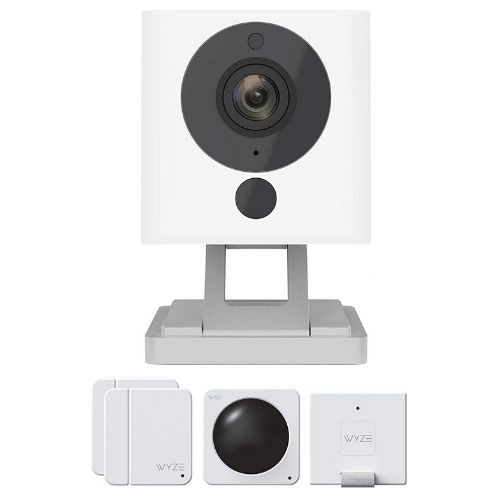
Wyze is the scrappy newcomer with unbeatable prices for its equipment. A starter kit costs only $20 and includes a motion sensor and door and window sensors. You can also buy cameras, locks, smart plugs, and lights for under $30.

Its low prices make Wyze a low-risk opportunity if you’re curious about smart home or home security basics. And while it doesn’t offer professional monitoring or outdoor cameras or sensors yet, we still think Wyze is worth watching in the coming years.

Read our full review of Wyze Sense to learn more.

Abode
Abode
abode security kit

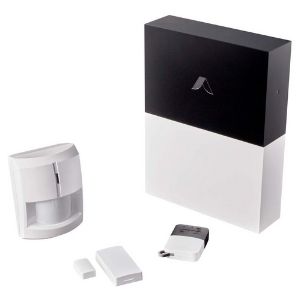
Abode has several kits and levels of service available, but it costs $179 to get started with a new system. The basic starter kit comes with a Gateway hub, motion sensor, key fob, and mini door sensor.

A security system this small is a good fit for small apartments or renters of all types. Abode only requires a one-time equipment fee and uses an app to set up and control your system. Of all the kits available, we like the Iota kit most. It’s easy to set up and includes a camera, door sensor, and fob for $219.

If you like Abode but want professional monitoring, it’s available for an extra $100. The good news is it’s a one-time fee, so you won’t have to worry about month-to-month payments.

Read our full review of Abode to learn more

Canary
Canary
canary flex with cord

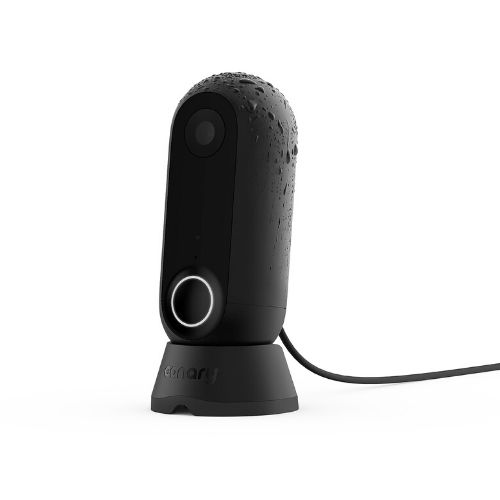
Canary is a camera-only security system. You can add up to 4 devices to your network to keep an eye on your home inside and out. They come with features like person detection and video clips for when you want to check in on your house.

The cheapest Canary camera, The View, costs $99 and shoots in 1080p HD video, has automatic night vision, and is compatible with Amazon Alexa and Google Assistant. There’s also the Pro camera with a built-in air quality monitor, making it a fitting choice for nurseries and kids’ rooms.

And while Canary doesn’t have professional monitoring available, you can pay $9.99/mo for extra perks like a safety button, two-way talk, and incident report services.

Read our full review of Canary to learn more.

Nest Secure
Google Nest Secure
Nest Secure tech

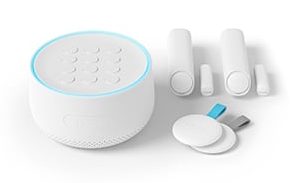
Nest Secure’s price is high but brings a lot to the table. The basic Secure kit comes with a Nest Guard hub, Nest Detect sensors, Nest Tag key fob, and the Nest App. The base station comes with Google Assistant built in and has multiple ways for arming and disarming the alarm.

Even the door and window sensors have cool features. At night or low lights, they glow to light your way around the house (or to the fridge for a midnight snack) They also chime every time they trigger, so you know when someone comes in and out of your house.

Like other self-monitored systems, you get security alerts and call the police through the app. You can also add other Nest products like cameras, thermostats, and the Protect smoke and CO alarm to your system from your phone.

While professional monitoring isn’t available directly through Nest, you can get it through Brinks if you want some backup for your system.

Read our full review of Nest Secure to learn more.

Scout
Scout
product image of Scout Security System

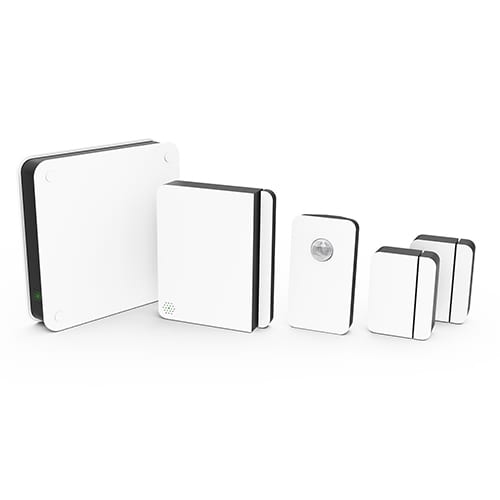
Scout self-monitoring security lets you choose a starter kit or build a system from scratch. This company offers a wide selection of devices such as a video doorbell, camera, and environmental sensors for smoke, water, and broken glass.

The cheapest system costs $229, but you still need to pay for the app at $9.99 per month. If there’s room in your budget, professional monitoring is available for a little bit more.

Read our full review of Scout to learn more.

Self-Monitoring Security System FAQs 

What are the best self-monitored security devices?

Start your self-monitored security system with security cameras armed with motion detection. You’ll be able to see what triggers alerts from your phone when emergencies strike.

The best security cameras have features like two-way talk and night vision. So whether it’s an intruder or your teen coming in late, you’ll be able to see what’s going on and speak with anyone on the other side.

Other Useful Sensors

Door and window sensors are small enough to put on anything that opens and closes. Entrances and windows are the obvious choice, but they can fit on other areas like medicine or liquor cabinets to keep out curious kids.

Alarms and sirens are a classic way to scare off intruders. Many self-monitored home systems allow you to sound the alarm from a mobile app.

Motion detectors have varying sensitivity, meaning they can be set off by different sized objects. If you have a large pet or kids, a motion detector is a good sensor to have to keep them out of rooms or areas you don’t want them in. They’re also handy around entrances so you know when someone’s home (or not supposed to be).

How can I avoid false alarms? 

Test your alarms and keep the batteries fresh, make sure your contact and motion sensors are securely on the wall, and wipe down camera lenses to avoid blurry footage and false positives.

And train everyone in your household on how to use the system. It’s easy for someone to trigger the alarm if they don’t know how it works.

Can I monitor individual security devices without an entire home security system?

Yes. Many companies offer multiple products that connect to a single smartphone app, so you can purchase devices individually and add them to the mobile app as you go.

Video doorbells, for example, aren’t attached to an alarm system. Instead, they have motion-activated video recording that alerts you when someone rings your doorbell. Many doorbell cameras let you talk to the person at your door, which can scare off a possible intruder.

We recommend testing the waters with a smart doorbell or smart lock if you’re not sure whether self-monitoring is right for you.

Can you monitor your own security system without a smartphone?

Some systems do offer internet monitoring through a PC or Mac, but most companies are phasing it out in favor of smartphone monitoring apps.

Can my friends or family help with monitoring? 

Yes, and we recommend it. Choose trusted friends, family members, or neighbors to receive security alerts for your system, so you’re not the only one handling any potential alarms.

Can I finance my security system equipment?

Not often. One reason professionally monitored security systems use contracts is to spread out the cost of your security system equipment. Companies will bundle your equipment payments with your monthly monitoring fee to give you a standard monthly payment. With a self-monitored system, it’s more likely you’ll have to pay for your equipment upfront.

Can I monitor SimpliSafe myself?

No, all the packages require professional monitoring of some kind. You can choose between the Standard (about $15/month) or Interactive (about $25/month) packages. But you’ll need professional monitoring if you want a SimpliSafe system.

Read our full SimpliSafe review for more information.

Does an ADT system work without monitoring? 

No, ADT is generally a professionally installed and professionally monitored system. Our ADT review goes more in depth about the company’s monitoring policies and prices.

What is the Best Self-Monitoring Security System? 

Whether you live in an apartment, condo, or large home, a self-monitored security system simplifies home security. But most systems (professionally or self-monitored) tend to come with up-front costs or some kind of optional add-on.

If you want a self-monitored home system without monthly payments and don’t care to tack on extras like video history, Wyze is our choice.

All of Wyze’s cameras shoot in HD and are easy to set up. The sensor packs suit small spaces better, but you can purchase additional sensors for a home for less money than a night at the movies.

Disclaimer

*Amazon.com list price as of 02/07/20 11:49 pm MST. Product prices and availability are accurate as of the date/time indicated and are subject to change. Any price and availability information displayed on Amazon at the time of purchase will apply to the purchase of this product. Safewise.com utilizes paid Amazon links.

Certain content that appears on this site comes from Amazon. This content is provided “as is” and is subject to change or removal at any time.

The post Pros and Cons of Self-Monitoring Home Security Systems appeared first on SafeWise.

Yale Smart Locks Review (Including Nest x Yale)

Best Keyless Lock
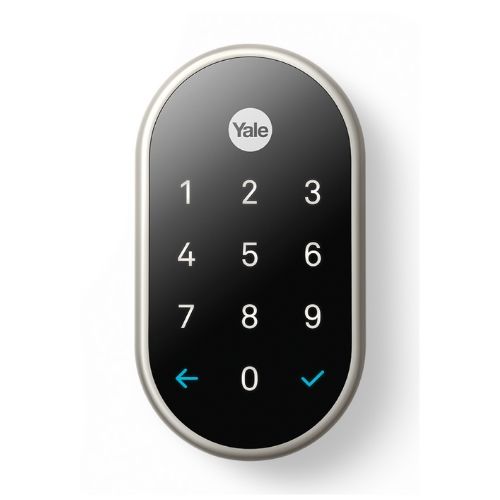
Nest-x-Yale-LockNest x Yale Lock
  • Attractive design
  • Longer warranty
  • Attractive design
  • Longer warranty
Best for Smart Homes
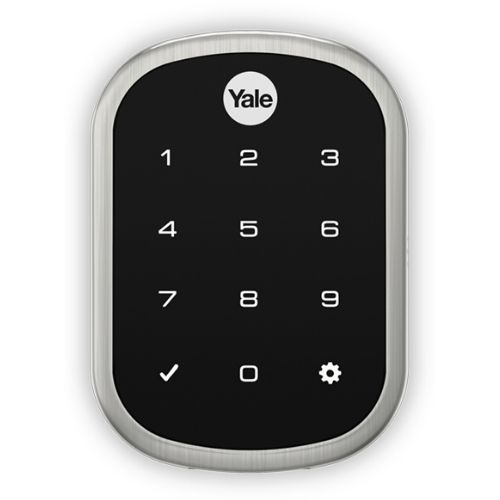
Yale Assure Lock SLYale Assure Lock SL
  • Keyless
  • Smart home flexibility
  • Keyless
  • Smart home flexibility
Best Door Handle
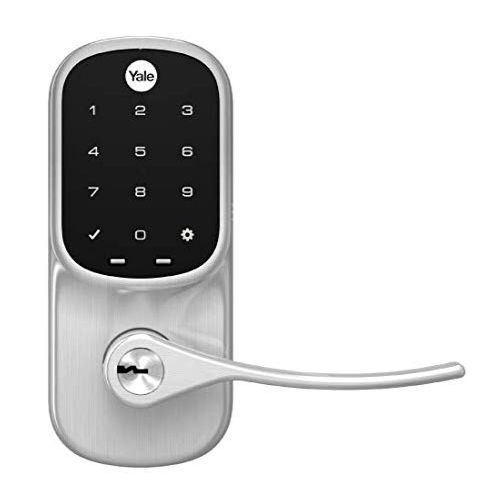
Yale Assure Lever TouchscreenYale Assure Lever Touchscreen
  • Replaces handles
  • Touchscreen keypad
  • Replaces handles
  • Touchscreen keypad

Go with Nest x Yale or Yale Assure Lock SL

We can’t get enough of the Nest x Yale and Yale Assure Lock SL. These locks are sleek, and their keyless designs eliminate the need to carry around a key.

Both locks have intuitive mobile apps and are easy to swap with an existing deadbolt using a screwdriver.

Nest x Yale Smart Lock

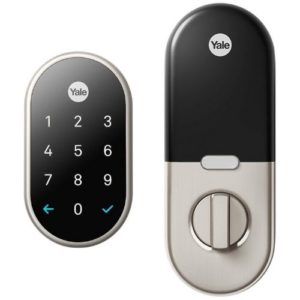
The Nest x Yale barely edges out the Yale Assure Lock SL as our favorite Yale smart lock because we like the excellent Nest app, curved design, and longer warranty. It’s the one to get if you use Google Assistant or have other Nest devices.

Yale Assure Lock SL

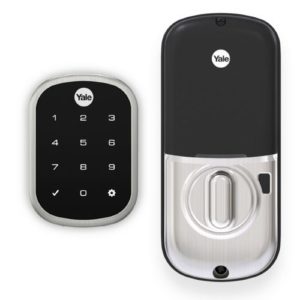
Still, the Assure Lock SL is a solid competitor, especially if you get the Connected by August version, which gives it superpowers like auto-unlock and open-door detection. These features are helpful in case you’re carrying groceries or if your kids sometimes leave the door open on their way outside.

While we think Yale’s other smart locks are great, they’re all Assure models with roughly the same features as the SL but not nearly as visually appealing.

Explore our Yale smart locks review to find one worthy of adorning your door.

Yale Smart Lock Comparison

Model
Image
List Price*
Physical Key Option
Smart Home Compatibility
Learn More
Nest x Yale Yale Assure Lock SL Yale Assure Lever Touchscreen Yale Assure Lock Keypad Yale Assure Lock Touchscreen
Nest x Yale Lock Yale Assure Lock SL Yale Assure Lever Touchscreen Yale Assure Lock Keypad Yale Assure Lock Touchscreen
$279 $299 $299 $259 $279
No
X
No
X
Yes
✓
Yes
✓
Yes
✓
Google Assistant, Nest Amazon Alexa, Apple HomeKit, Google Assistant Amazon Alexa, Apple HomeKit, Google Assistant Amazon Alexa, Apple HomeKit, Google Assistant Amazon Alexa, Apple HomeKit, Google Assistant
View on Amazon View on Amazon View on Amazon View on Amazon View on Amazon

*Amazon.com list price as of 02/07/2020 at 2:00 p.m. (MT). Full disclaimer.


Yale Smart Locks Similarities and Differences

Before we dig into what makes each Yale smart lock special, let’s explore some standard features you can find in every model. We’ll also highlight the critical differences between Yale’s Assure series of locks and the Nest x Yale.

Similarities

Here are some features you’ll find in every Yale smart lock, which should make it easier to choose from Yale’s wealth of options.

Finishes

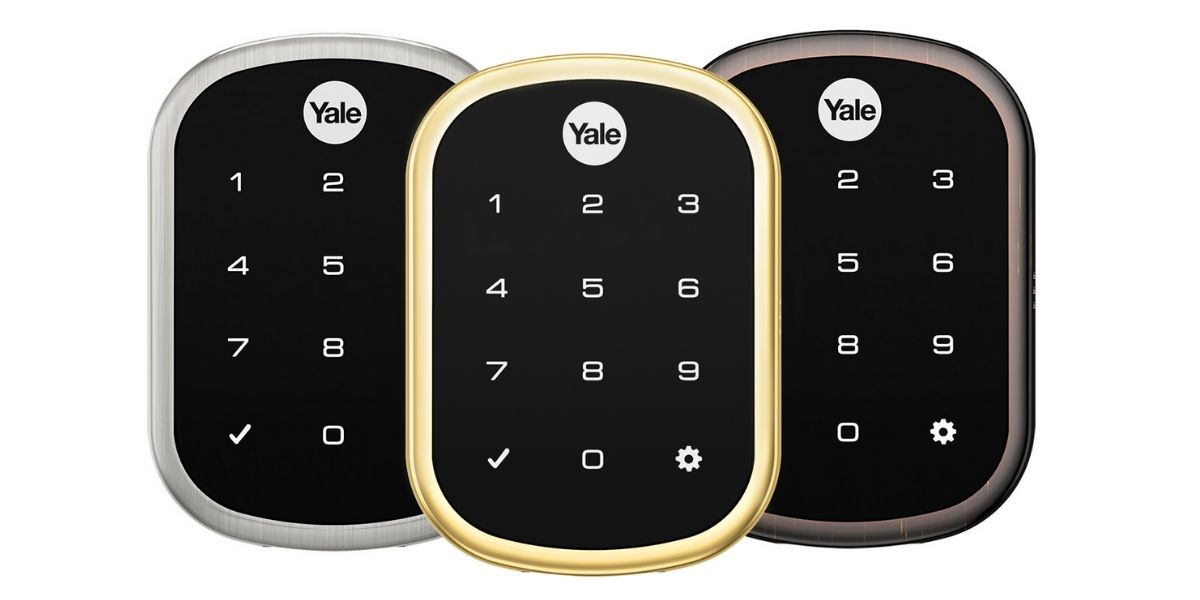
Yale offers smart locks in three finishes: satin nickel, polished brass, and oil rubbed bronze. This lets you match the lock to your existing handle in case you don’t want to buy a new one.

Yale Lock Finishes

Yale locks come in three finishes: satin nickel, polished brass, and oil rubbed bronze.

Mechanical Warranty

Aside from the electronic components, Yale smart locks all provide a lifetime warranty that covers the mechanical parts and exterior finish of the lock. This is common in smart locks.

ANSI Grade 2

All of Yale’s smart locks have a security rating of ANSI/BHMA Grade 2 (Grade 1 is highest). They aren’t as strong as the Schlage Connect, a Grade 1 lock, but are ideal for use in residential settings.

Automatic Lock

You can set each lock to relock automatically after you open the door. With Yale Assure models, the lock engages after 30 seconds, which is long enough for most people. The Nest x Yale lets you choose between 10 seconds, one minute, and five minutes.

While everyone benefits from automatic locking, it’s most useful for people who often forget to lock the door or people trying to develop better security habits.

Keypads

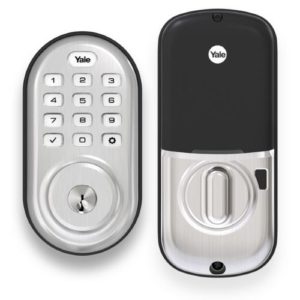
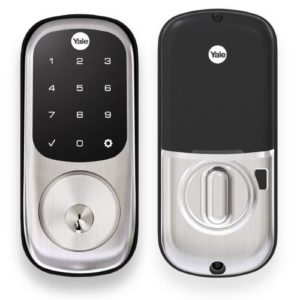
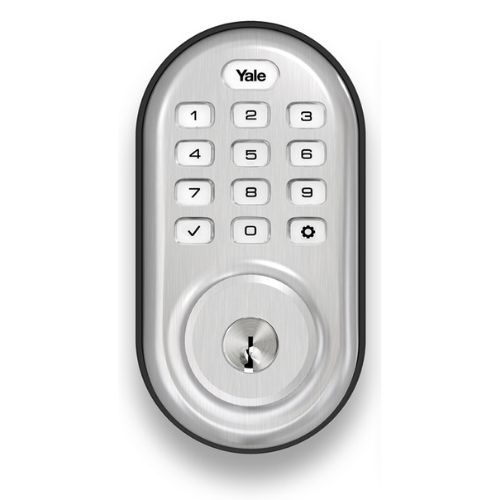
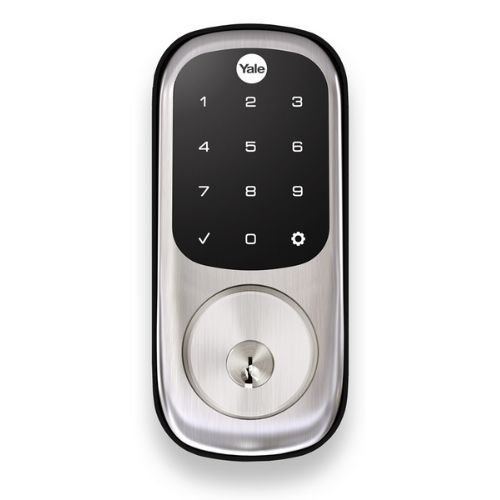
All of Yale’s smart locks have a keypad for quick access without a smartphone. You can also give out custom keycodes to trusted friends and family. Most of the models have an attractive touchscreen keypad, but there’s also a cheaper version with physical buttons instead.

Batteries

Each of these locks uses four AA batteries with an average battery life of about one year. If the batteries die while you’re away from home, most Yale smart locks let you manually open the lock using a physical key.

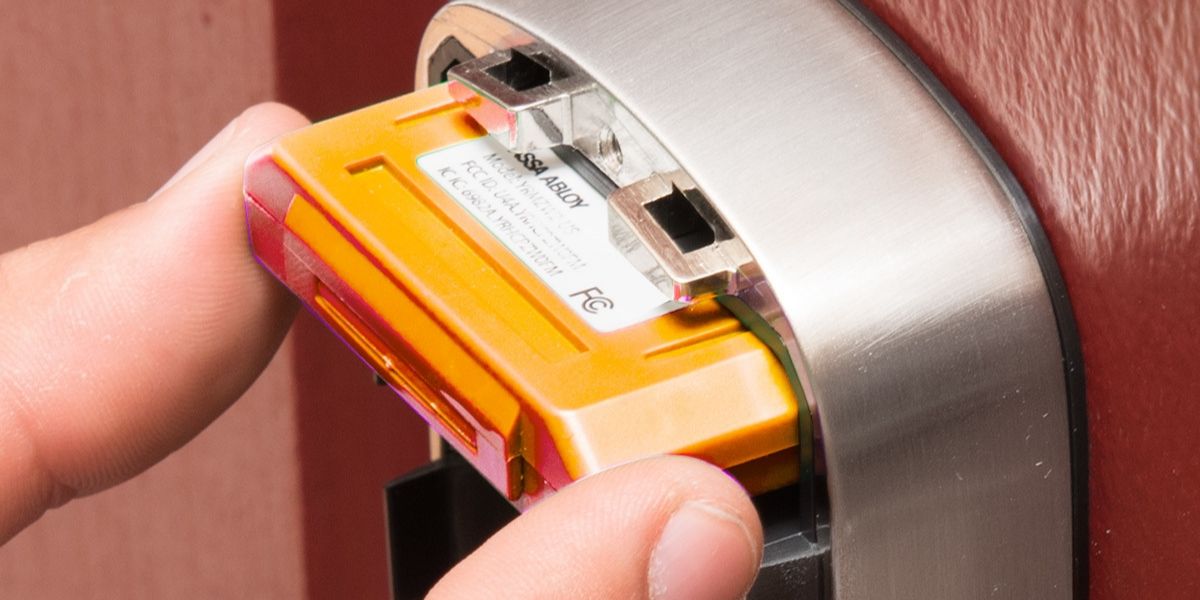
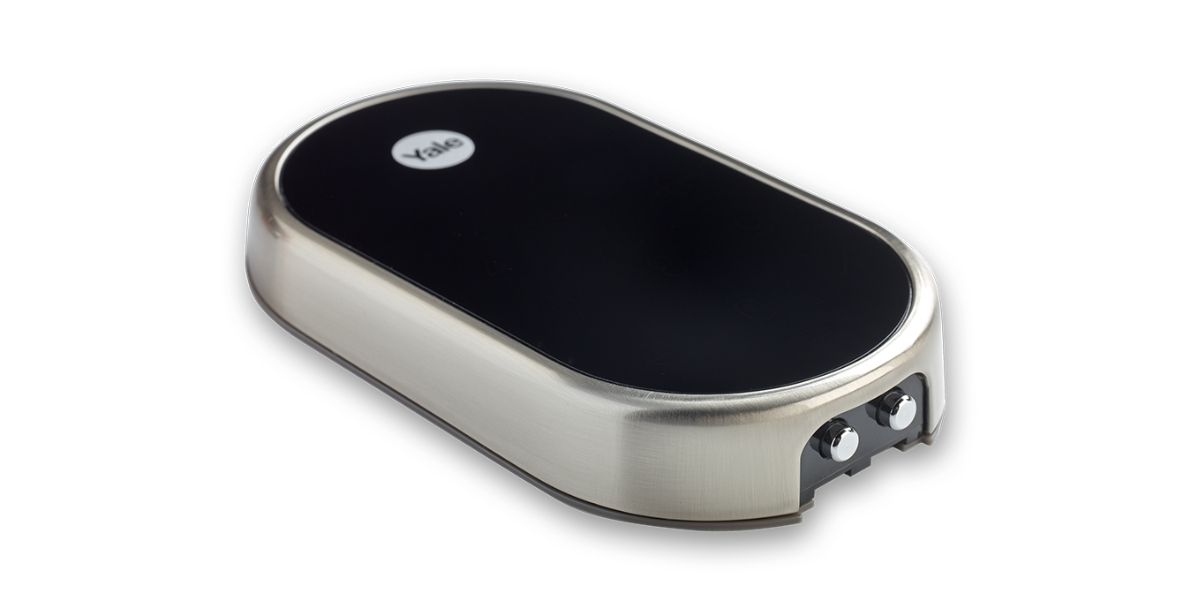
Key-free models like the Yale Assure Lock SL and Nest x Yale don’t use physical keys, but you can connect a 9-volt battery to terminals on the bottom of the keypad for temporary power to get in.

Yale’s keyless locks (Nest x Yale pictured) have 9V backup battery terminals on the bottom of the keypad.

Installation

The installation process takes less than 30 minutes and requires a screwdriver and a smartphone. In the rare case when you don’t have the appropriate holes in your door and door frame, you’ll need a power drill. You can also hire a locksmith if you don’t want to install the lock yourself.

After installation, put in the batteries and radio module. Follow the instructions to connect the lock to a Wi-Fi network or smart hub so you can use the mobile app.

Differences

There are four differences between the Nest x Yale and Yale Assure that are worth noting: modules, mobile apps, electronics warranties, and the number of key codes.

Yale Assure Modules

One of the unique things about Yale Assure locks is that they’re modular, meaning you buy a base lock and a radio module for whichever smart home system you use.

This means that you don’t have to buy an entirely new lock if you switch smart home platforms down the line, just a new module.

Yale sells four modules:

  • The Connected by August module ($129) gives your lock Wi-Fi and Bluetooth functionality. With this module, you can connect your lock to Amazon Alexa, Google Assistant, and Siri (Apple HomeKit). It adds a few features like DoorSense and auto-unlock, making it the most expensive module. Still, the added flexibility is worth it.
  • The Apple HomeKit module ($49) communicates directly with Apple devices like the iPhone, iPad, and Apple TV.
  • The Z-Wave module ($49) works with smart home hubs like Samsung SmartThings.
  • The Zigbee module ($49) works with smart home hubs like the Amazon Echo Plus and Samsung SmartThings.

Shut The Door

The Connected by August module includes August’s DoorSense feature, which detects when your door’s open. DoorSense is a handy way to prevent the deadbolt from engaging prematurely. The August app can also automatically unlock the lock as you approach the door, so you get benefits on both sides of the door.

The Nest x Yale doesn’t use a module but has built-in Bluetooth and Thread (similar to Zigbee) radios that allow it to communicate with your smartphone and other Nest hardware.

yale assure homekit

Yale Assure smart locks have interchangeable radio modules for different smart home systems (Apple HomeKit module pictured).

Mobile Apps

Depending on the module you use in your Yale Assure lock, there are a variety of mobile app experiences. If you have the Connected by August module, you’ll use the August app, which is one of our favorite smart lock apps because it’s very easy to use.

If you have the HomeKit module, you’ll control the lock using Siri and the Apple Home app on a variety of Apple products. While the HomeKit controls aren’t as full-featured as the August app, it’s a great way to control all of your HomeKit compatible devices from the same app instead of jumping between different apps across your smart home.

If you choose either the Z-Wave or Zigbee module, you’ll need a smart home hub like Samsung SmartThings (Z-Wave and Zigbee) or Amazon Echo Plus (Zigbee) to control the lock. In this case, you can expect to use the app from whichever hub you have, which may or may not be a good thing depending on the app.

Unlike the modular Yale Assure locks, the Nest x Yale requires the Nest app or Google Home app. Both of these apps are quite easy to use, but unless you already use Google Assistant or other Nest products, you’ll want a Yale Assure lock for Amazon Alexa or HomeKit.

Nest x Yale Electronics Warranty

Nest products typically have longer warranties than other smart home products, and the Nest x Yale is no different. It has a two-year warranty on electronic components where similar Yale smart locks offer only one year of coverage.

Number of Key Codes

The Nest x Yale tops out at 20 codes while Yale Assure locks hold up to 25 codes. If you connect Yale Assure locks to an app or smart home system, each can hold up to 250 codes. You might want more capacity if you’re a landlord or run a small business.


Yale Smart Lock Reviews

1. Nest x Yale: Best Keyless Lock

Best Keyless Lock
Nest-x-Yale-Lock

Nest x Yale

The Nest x Yale is the best standalone Yale smart lock for people that want only mobile app controls. The Nest app has more customizable settings than other Yale locks like setting the delay of auto-lock. Another feature we like is that it helps you set up secure codes for your family, so a burglar can’t guess the code by using the most common codes like 1234 and 0000.

We like its long two-year warranty because no other Yale smart lock has it. If you have a Nest or Google smart home, we think this is the best smart lock to get. Still, it’s not a good option if you use Alexa or Siri.

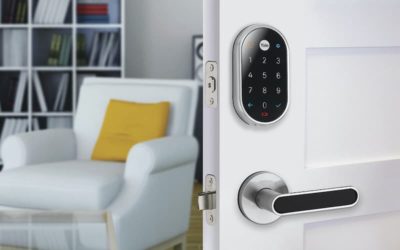
On the aesthetic front, the Nest x Yale’s minimalist design turns your door into a high-tech gateway.


2. Yale Assure Lock SL: Best for Smart Homes

Best for Smart Homes
Yale Assure Lock SL

Yale Assure Lock SL

The Yale Assure Lock SL is the best Yale lock for a smart home because of its flexible radio modules, especially the Connected by August version. We like the August-specific abilities like auto-unlock and DoorSense, which tells you when the door’s open.

Even though the Connected by August version costs $299, we prefer it over other modules because it works with the most popular smart home systems like Amazon Alexa, Apple HomeKit, and Google Assistant. The Yale Assure Lock SL costs around $20 to $40 more than other models, making it the most expensive Yale smart lock.


3. Yale Assure Lever Touchscreen: Best Door Handle

Best Door Handle
Yale Assure Lever Touchscreen

Yale Assure Lever Touchscreen

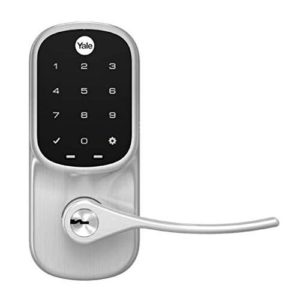
If you have a door without a deadbolt lock, then you can replace the handle with the Yale Assure Lever Touchscreen. Even if your exterior doors have deadbolts, this handle is surprisingly useful on interior doors in your home. You could secure a closet full of valuables or separate your home business from the rest of your home.

This door handle also comes in key-free versions and versions with physical buttons on the keypads.


4. Yale Assure Lock Keypad: Best for Physical Buttons

Best for Physical Buttons
Yale Assure Lock Keypad

Yale Assure Lock Keypad

If you want a simpler lock without a touchscreen keypad, opt for the Yale Assure Lock Keypad. A physical keypad gives you tactile feedback, which is helpful if you have vision problems and need to feel the buttons before pressing them. It also works when you’re wearing thick gloves in the wintertime, which don’t work too well with touchscreen keypads.

In addition to the keypad, you can open your door with a physical key, which is helpful in case you have trouble remembering key codes or don’t always carry a smartphone. This way you can give out codes to your friends and family members instead of giving them a spare key.


5. Yale Assure Lock Touchscreen: Best for Physical Keys

Best for Physical Keys
Yale Assure Lock Touchscreen

Yale Assure Lock Touchscreen

The only reason to get the Yale Assure Lock Touchscreen is if you want the option to use a physical key to bypass the keypad but don’t want physical buttons like on the Yale Assure Lock Keypad.

If you’re not attached to physical keys, the Yale Assure Lock SL is the better option since it’s less bulky for slightly more money.


Which Yale Smart Lock is Best?

The Nest x Yale is perfect for Google-based smart homes, while the Yale Assure Lock SL (Connected by August) is a great option that covers Amazon Alexa, Apple HomeKit, and Google. While the design and warranty of each lock differs slightly, the lock you choose mostly depends on the smart home system you use.


Yale Smart Lock FAQ

Does the Yale lock work without Wi-Fi?

Yes, you can use the keypad or a physical key to open your door without Wi-Fi. You can also add new codes and change most of the settings using the lock’s keypad.

Wi-Fi is required only when you need to use a mobile app for remote access or want an easier way to change settings. All Yale locks (no matter which module you get) require an adapter or smart hub to access your Wi-Fi network.

Here’s a list of the Wi-Fi adapters you can use with Yale smart locks:

Lock or Module Wi-Fi Adapter
Nest x Yale Google Nest Connect (included) or
Google Nest Guard (optional)
Connected by August Module August Connect (included)
HomeKit Module Requires Apple TV, HomePod, or iPad
Z-Wave Module Requires Z-Wave smart hub
Zigbee Module Requires Zigbee smart hub

Is the Nest x Yale lock secure? Can it be hacked?

Google Nest uses encrypted radio frequencies to reduce hacking risks. Even with encryption, no product is completely unhackable, so it’s essential to do your part by setting strong passwords on your smartphone, wireless network, and Google account.

Why do some Yale locks use the August app?

Yale and August are both divisions of Assa Abloy, a Swedish company that manufactures security products like locks and access control solutions. Assa Abloy acquired August in 2017.

After the acquisition, Yale collaborated with August to create the Connected by August module for its smart locks. Only Yale locks with this module work with the August app.

What are ANSI/BHMA security ratings?

Security ratings indicate how well a lock resists lockpicking and brute force attempts to get past the lock. The standards governing locks come from the American National Standards Institute (ANSI) and the Builders Hardware Manufacturers Association (BHMA).

Under the ANSI/BHMA grading system, Grade 1 locks have the highest rating, making them an excellent choice for businesses and homes alike. While Grade 2 locks aren’t as robust, they’re more than enough for most homes. We recommend using Grade 1 or Grade 2 locks if you want the best security.


Things to Consider before Buying a Yale Smart Lock

Once you choose the Yale smart lock style that you want, double-check that you’re getting the right module for your smart home system. If you haven’t settled on a smart home system yet but want the option later, get a version without a module to avoid spending money on a module you’ll never use.

If you’re not sure that a Yale smart lock is the right choice, check out our review of the best smart locks to see if there’s a better option for your home.


How We Evaluated Yale Smart Locks

In my time as a security expert, I’ve used dozens of smart locks including the Nest x Yale, Yale Assure Lock SL, and Yale Assure Lock Touchscreen. I used those experiences to ground my conclusions about the other two locks in our comparison: Yale Assure Lock Keypad and Yale Assure Lever Touchscreen.

When I started my research, I narrowed down which models I wanted to highlight based on how useful they are in different situations. To simplify the comparison, I focused on the Connected by August features of Yale Assure locks rather than jumping between different smart home platforms.

I spent around two hours researching Yale’s website to learn the features in each lock and also looked through online customer reviews for a few hours to get a picture of how people use their smart locks. You can learn more about how we evaluate products in our full methodology.

Disclaimer

*Amazon.com list price as of 02/07/20 02:00 pm MST. Product prices and availability are accurate as of the date/time indicated and are subject to change. Any price and availability information displayed on Amazon at the time of purchase will apply to the purchase of this product. Safewise.com utilizes paid Amazon links.

Certain content that appears on this site comes from Amazon. This content is provided “as is” and is subject to change or removal at any time.

The post Yale Smart Locks Review (Including Nest x Yale) appeared first on SafeWise.
Wednesday, February 5, 2020

Alert 360 Alerts Homeowners to Home Security Sales Scams

Alert 360, a top rated and industry leading home security company, is warning homeowners with home security systems about common security scams used by some security companies. These home security companies often use false sales tactics to trick homeowners into signing contracts, which can result in homeowners being billed by two companies for the same service.

“While spring and summer often are prime times for door-to-door sales and potential security contract scams, we’re hearing from customers who are being approached year round, especially in our service areas with warmer climates,” said Richard Ginsburg, president and CEO, Alert 360. “Our customers who use our ‘Scam Alert’ webpage and hotline share that these suspicious tactics include representatives from other home security providers posing as our representatives who want access to their homes, accounts, or security systems. These tactics are not uncommon, and we’ve been working with our customers for years to raise awareness of this security threat and share steps to avoid being scammed.

“These high-pressure and deceptive sales practices often result in a homeowner unknowingly signing contracts with two home security companies, damage to the security system, and unintended access to a bank account,” said Ginsburg. “We always recommend that homeowners not feel pressured to sign a contract without taking time to review the details, understanding the terms, and checking with their current security provider.”

With nearly 50 years of experience installing home security systems and providing security alarm system monitoring, Alert 360 warns home security owners to be on the alert for home security salespersons who might:

Tell you that your current home security provider is no longer in business, no longer serves your area, or was sold to their company;

-Ask you to sign a new contract to ensure your security service continues;

-Request access to your security system or tells you that your system has been recalled, requires replacement or repaired;

-Show documents to support claims they need access to your system; and

-Use high-pressure tactics to force you to sign a new contract on the spot and won’t allow you to contact your current provider.

-Alert 360 shares these steps to safeguard your home, security system, and bank accounts:

-Call your home security company to confirm it has sent a representative or to check the details;

-Check all the details before signing a contract so that you don’t end up being billed by two home security companies;

-If you have a doorbell camera, view who’s at your door using a mobile app and your smartphone, or ask the visitor for more information, such as a company name and phone number – even if you’re not home;

-Know the facts. Stay up to date on news from your home security company by checking its website often and following your provider’s blog and social media accounts; and

-Report suspicious activity concerning a person going door to door in your neighborhood, or call your home security provider when you have concerns.

“At Alert 360, we take providing home and business security very seriously and have been combatting deceptive security sales for decades,” said Ginsburg. “Fortunately, when homeowners are aware of these tactics and know the steps to avoid being scammed, they can more easily protect their homes, security systems, and bank accounts. We encourage all Alert 360 customers to visit Alert360.com and click on the ‘Scam Alert’ tab at the top of our homepage.”

Alert 360 provides a full line of home security, business security systems, energy management, and home automation services. These products and services include wireless security systems, a free mobile app, wireless home security cameras, HD video surveillance, access control, smart thermostats, water leak detection devices, doorbell cameras, monitored heat and carbon monoxide detectors and more. Alert 360’s certified security technicians also offer professional installation or integration of smart home devices, such as sprinkler systems, sound systems, Amazon Echo and Google Home.

Your Local Alert 360 Home Security Company Can Help! Find a local Alert 360 home security office near me at Alert360.com. Visit our Alert 360 Home Security Support Center and FAQs for helpful online help anytime or contact us here.


We have coast to coast office locations. If you would like a free security review or quote, click here!

Branch offices:
Anaheim, CA
Austin, TX
Clinton, OK
Dallas, TX
Fort Worth, TX
Fresno, CA
Houston, TX North office
Houston, TX South office
Kansas City, KS
Miami, OK
Oklahoma City, OK
Phoenix, AZ
Sacramento, CA
San Antonio, TX
San Diego, CA
Sarasota, FL
Springfield, MO
Tulsa, OK
Wichita, KS

The Alert 360 blog is recognized as a top 10 home security Blog post in the nation.

The post Alert 360 Alerts Homeowners to Home Security Sales Scams appeared first on Alert 360.

Tuesday, February 4, 2020

Complete Home Safety and Security Checklist

Is your home secure? Answer these questions to find out where you rank with your home security. Whether you’ve lived in your home for 2 weeks or 12 years, use this list to help make your home a safe place for you and your loved ones.

Home Safety Assessment Questions

  1. Are any of your valuables visible from the street?
    Residential burglaries account for nearly 75 percent of all break-ins in America. If you can see valuables inside your home from the street, so can a burglar. Burglars are notorious for “window shopping” so SafeWise encourages you to keep valuables, like cash, jewelry, electronics and guns, out of view.
  2. Are your doors and windows visible from the street or from a neighbors view?
    Burglars are always looking for ways to get into your home without being seen. Overgrown shrubs give them the concealment they want to break into your home without the neighbors noticing. Keep shrubs trimmed and be sure to use the yard signs and window decals provided by your home security company to alert potential burglars that your home has help being protected.
  3. Are your doors made of either solid wood or metal clad?
    Nearly one third of burglars enter a home through the front door. An old wooden door or a hollow one can be kicked in within seconds. Help beef up your home’s security by installing a windowless solid wood or metal clad door.
  4. Are your entryways and pathways well lit at night?
    A dark entrance or pathway is not only a safety hazard, it’s like rolling out the welcome mat for a burglar. SafeWise encourages you to use pathway lighting and motion lighting to illuminate your home’s exterior. Some alarm monitoring providers even offer apps that let you control your home’s lighting from your smartphone.
  5. Is your house number clearly visible from the street?
    When an emergency strikes, every second counts. Make sure that police, firefighters, and/or paramedics can quickly find the right house by keeping your house numbers visible. SafeWise advises checking your house numbers quarterly to ensure they haven’t faded or been obstructed by vegetation.
  6. Can you see who’s at the door without opening it?
    Opening the door to your home without knowing who’s on the other side can be frightening and dangerous. SafeWise urges home owners to select a quality door that’s equipped with a peep hole. If your home already has a quality door installed, but it doesn’t have a peep hole, you can purchase one and install it in the door. Wide angle peep holes are best because they offer the greatest range of view.
  7. Do you have a cell phone in case of cut telephone wires?
    Even if you don’t use a cell phone as your primary means of communication, having one handy is a good safety and security precaution. Some criminals will cut phone lines before they enter the home, so having a charged cell phone to call for help can benefit you.
  8. Do you have a neighbor who has a spare set of keys to your home?
    It’s always a good idea for a neighbor to be armed with a set of spare keys should you get locked out or if they need to enter your home in the event of an emergency. Just make sure it’s a neighbor you can trust.
  9. Do you have all your mail held at the post office when you travel?
    There are certain things a burglar looks for when he’s casing a neighborhood; an overflowing mailbox is one of them. Have your mail held at the post office if you’re travelling for an extended period of time or have a neighbor/relative pick the mail up for you.
  10. Do you have an emergency escape plan in case of break-in?
    A burglar trying to break-in is a homeowner’s worst nightmare. SafeWise believes you can never be too prepared for the unthinkable, so establish and practice an emergency escape plan with your family once or twice a year to make sure everyone is prepared in the case of a break-in.
  11. Do you have any yard signs or window decals that state your home is monitored?
    Be sure to display the yard and window decals that your home security company provides you with. SafeWise recommends placing these decals on the windows that face the side and rear of your home, as well as in the front, because 50 percent of the time a burglar enters the home via a window or back door.
  12. Do you have fire extinguishers easily accessible throughout your home?
    In 2012, a home structure fire was reported every 85 seconds in America. If a fire were to break out in your home right now, is your fire extinguisher easily accessible and functional? In addition to fire extinguishers, SafeWise suggests adding smoke and fire monitoring to your home security plan so your family will be alerted the moment trouble is detected.
  13. Do you have keyed deadbolt locks installed on all of your doors?
    A burglary occurs roughly every 20 seconds in the U.S., outfitting your home’s front and back door with a hardened steel bolt is your first line of defense against a burglar because it makes the door much more difficult to kick in.
  14. Do you have motion-sensor lights installed?
    The last thing a burglar wants is the spotlight. Incorporate motion-sensor lighting into your home security plan and you’ll send a strong signal to burglars that you take protecting your home seriously. In addition to securing the perimeter of your home, SafeWise advises also using motion-sensor lighting to secure sheds and garages.
  15. Do you have secondary locks on sliding glass doors or do you secure the door with a dowel on the inside track?
    Burglars love sliding doors, especially during the summer when they’re often left unlocked or open. You should know July and August are the two hottest months for break-ins, so be sure your sliding doors are locked, and outfitted with a secondary locking mechanism or dowel to provide additional security.
  16. Do you have secondary locks on your windows?
    Windows account for a quarter of all break-in entry points. That’s because they are frequently left unlocked, or outfitted with cheap window locks make them vulnerable to attack. Make it difficult for anyone to get in with help from secondary locks and window sensors.
  17. Do you have timers on your lights?
    Daytime burglaries account for nearly 40 percent of all break-ins, but a dark house is practically begging for a break-in. Inexpensive, easy to install, and simple to operate, there’s no reason why you shouldn’t have timers on your lights to make your home look occupied while you’re out and about. Alternatively, many home security companies offer apps that let you turn lights on and off right from your smartphone.
  18. Do you keep an inventory of your personal property in case of theft?
    In the event of a burglary, you don’t want to forget to include any stolen property on a report for the police or an insurance claim. Keeping an inventory of your personal property helps ensure you are compensated for all losses.
  19. Do you keep mediations out of sight?
    Keeping medications out of sight means helping keep them out of the hands of burglars who could use your meds themselves or sell them on the street. Keeping your medicines off the counter helps reduce the temptation.
  20. Do you keep your valuables stored in a safety deposit box or safe?
    To keep your valuables safe, your best option is to keep them somewhere difficult for potential burglars to reach, such as a safety deposit box or a safe. Both of these can only be opened with a key or combination, so intruders can’t easily access them.
  21. Do you know your neighbors across the street and on all three sides of your home?
    Good neighbors look out for each other and share any suspicious activity they’ve noticed around other homes, particularly when someone is out of town or at the office. Knowing your neighbors is crucial for maintaining a sense of security in your area.
  22. Do you leave a house key under your door matt?
    Under the door mat is often one of the first hiding places a burglar will check for keys. Your best bet is to leave a spare key with a nearby, trusted neighbor or relative.
  23. Do you lock the gate(s) to your backyard?
    About 30 percent of all burglaries occur when a door or window is left open or unlocked, including those in the backyard. Keep the gates to your backyard locked, especially at night and when you are not at home, to help keep chances of burglary to a minimum.
  24. Do you lock up your grills, lawn mowers, bikes, or other outdoor valuables?
    Any valuable property that is kept outdoors should be locked up when not in use to keep it from being easily accessible for burglars. If you can put it out of sight and lock it up, that’s even more ideal.
  25. Do you lock all doors at night and every time you leave the house, even if it’s just for a few minutes?
    It doesn’t take long for a burglar to break into your home, especially if a door is left unlocked. Even if you’re only leaving home for a moment, it’s important to always lock the door behind you. The same goes for locking the doors at night. Even if you’re home, the doors should be locked.
  26. Do you shred documents with personal information before disposing them?
    Even if it’s something like unwanted junk mail, you should always shred any document that may have personal information on it before throwing it in your trash can. This can help you ensure your personal identity is less at risk for being stolen.
  27. Do your doors fit tight in their frames?
    While an unlocked door is the most common entry point for a burglar, a flimsy door is another common way to break-in. If your doors do not fit tightly, you should install weather stripping around them to better hold them in place.
  28. Does your neighborhood have a watch program?
    A good quality neighborhood watch program is to have a focus on educating neighbors on how to actively look out for one another to prevent or lessen crimes in their area. Burglaries decreased more than 30 percent nationwide throughout the 1990s, thanks to neighborhood watch programs.
  29. Have all your doors been rekeyed since you moved in?
    If your home or apartment was owned by someone before you, they (or whoever they gave keys to) could still potentially have a key that can unlock your doors. It’s best to rekey your home—which is easier than changing out all of the locks—so only you have all of the copies of the key to your home.
  30. Have there been any break-ins in the neighborhood recently?
    If a house in your neighborhood has been broken into, you need to be on higher alert about your own home security. You could face an increased risk of burglary, as burglars may return to the area of a successful break-in and target similar homes nearby.
  31. Have you secured any mail slots, dryer vents, or pet entrances that a burglar could enter through?
    Even if you keep all of your doors and windows locked, burglars can still attempt to access locks from a dryer vent, mail slot or pet entrance. It’s important to have some sort of box, cage, or other locking mechanism over these possible entry points to help keep your home as burglar-proof as possible.
  32. Is your home’s exterior well lit?
    If you have the right outdoor lighting in place, a well-lit home could help deter burglars from trying to enter your home. It’s easier to be seen with outdoor lighting, so burglars are more likely to stay away from lights and go in search of darker places to target.
  33. Is your street well-lit at night?
    In addition to having a well-lit home, having a well-lit neighborhood can be another deterrent for burglars. If the neighborhood is kept well-lit at night, it can help the area be safer to walk around, and burglars are more likely to stay out of the neighborhood as a whole.
  34. Do you have a company that monitors your home alarm system?
    Home security providers can offer 24/7 monitoring of your home and can notify you of emergencies in your home, including fire, carbon monoxide, or a burglary, wherever you are. You’ll also have a trained monitoring specialist on the line ready to help you contact the authorities if necessary. Compare alarm monitoring providers to find the right one for you.
  35. Do you have surveillance cameras?
    Nine out of ten convicted burglars say they’d avoid targeting a home with video surveillance. If you’re looking to take your home security to the next level, surveillance cameras can be a strong addition to any home security strategy.
  36. Do you have working carbon monoxide detectors?
    Each year, more than 150 people die from non-fire related carbon monoxide poisoning. SafeWise recommends installing carbon monoxide detectors and test them regularly (once a month) to make sure you’re protected against this invisible danger.
  37. Do you have working smoke detectors?
    Three out of five house fire deaths occur in households without working smoke alarms. Make sure to check batteries and test your smoke detector regularly (at least twice a year).
  38. Do you store your ladders and tools in a locked garage or shed?
    Don’t give would-be burglars the tools they need to break into your house. Make sure tools, ladders, and any other equipment they could utilize is kept locked away.
  39. Have you installed a home security system?
    Homes without security systems are more likely to be burglarized than those with a security system.  60% of convicted burglars say the presence of an alarm would cause them to seek a different home to burglarize. SafeWise recommends reading reviews and comparing security providers to decide which one is right for you.

If you’re like most homeowners, you may not know about all of the things that would make your home vulnerable. Now that you’ve gone through our home security checklist, you can assess possible weaknesses in your home and fix areas that will help burglar-proof your home.

The post Complete Home Safety and Security Checklist appeared first on SafeWise.